I work on signal-processing workflows for recording investigation, repeatable comparison reports, compact-model export and audio-driven motion timelines.
Five case studies cover analysis work and implemented prototypes. Client recordings and source code remain confidential, so an original synthetic example in case 02 makes a comparison output inspectable.
01Audio restoration & investigationAnalysis & reportingReports: August 2026
Investigating noisy, low-bandwidth recordings
Four difficult recordings needed an assessment of background noise, discrete events and possible speech. I combined spectral analysis, classical processing and pretrained speech-enhancement models, then compared event and voice-activity diagnostics across the outputs.
Task
Examine events obscured by interference and limited bandwidth.
My role
Signal investigation, processing comparisons and preparation of the analysis reports.
Processed recordings and reports distinguishing candidate speech, tonal interference and unresolved events.
Evaluation
Compared spectral, event and voice-activity findings; no ground-truth transcript or measured intelligibility gain is established.
PythonDeepFilterNet3MetricGAN+SepFormerSilero VAD
What the analysis can establish
Enhancement can support listening and investigation. A voice-activity score does not certify words, speaker identity or recording authenticity, and enhancement models can introduce artefacts. Reports retain these limits rather than promise recovered speech.
Successive turntable accessory experiments needed a consistent reporting workflow. I developed tools to compare spectra, band energy, recording dynamics and channel relationships across test rounds. One combined report covered 156 recorded mat/clamp combinations.
Task
Compare many recorded conditions consistently and present their differences clearly.
My role
Analysis scripting, comparative figures and structured reporting across successive rounds.
Method
Batch analysis, frequency-band summaries, comparison plots and common reporting templates.
Output
Analysis scripts, comparison figures and reports, including the 156-combination report.
Evaluation
Recording-level comparisons; interpretation depends on acquisition controls, calibration and consistent metric definitions.
Recording differences alone do not establish a hardware-performance advantage.
A small sound classifier with an embedded export path
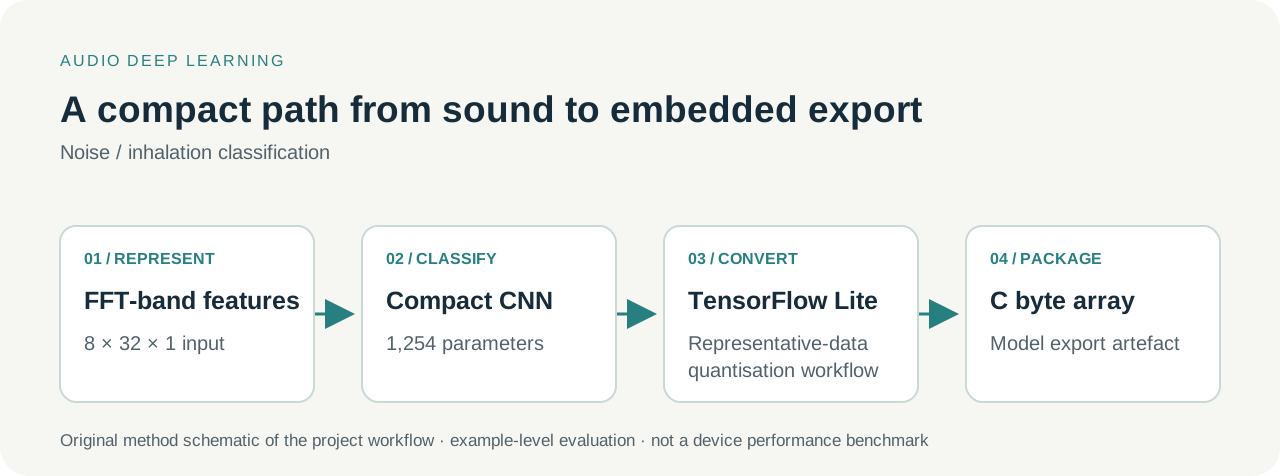
An acoustic device project required a compact model to distinguish inhalation sounds from background noise. The project implementation uses 32 FFT-band features across eight frames and a 1,254-parameter convolutional network, followed by TensorFlow Lite conversion and C byte-array export.
Project scope
Feature preparation, offline classification and model-export artefacts for subsequent device integration.
Input & method
8 × 32 × 1 feature input; compact CNN training and representative-data quantisation/conversion.
Output & evaluation
Saved model, example-level evaluation and export artefacts prepared for a separate integration step.
Represent the recording
Arrange eight frames of 32 FFT-band features as the model input.
Train and evaluate offline
Use a compact 1,254-parameter convolutional classifier for the recorded examples.
Convert the model
Prepare representative data for the TensorFlow Lite quantisation/conversion workflow.
Package the export
Export a C byte array for subsequent device integration and testing.
Original explanation of the project workflow. Example-level results do not establish performance on independent users or devices. Target-hardware latency, memory and clinical performance require separate tests. Open the larger workflow schematic (SVG): compact classifier.
04Audio-driven motionOffline prototypeSaved documentation: September 2025
Turning game audio into a motion timeline
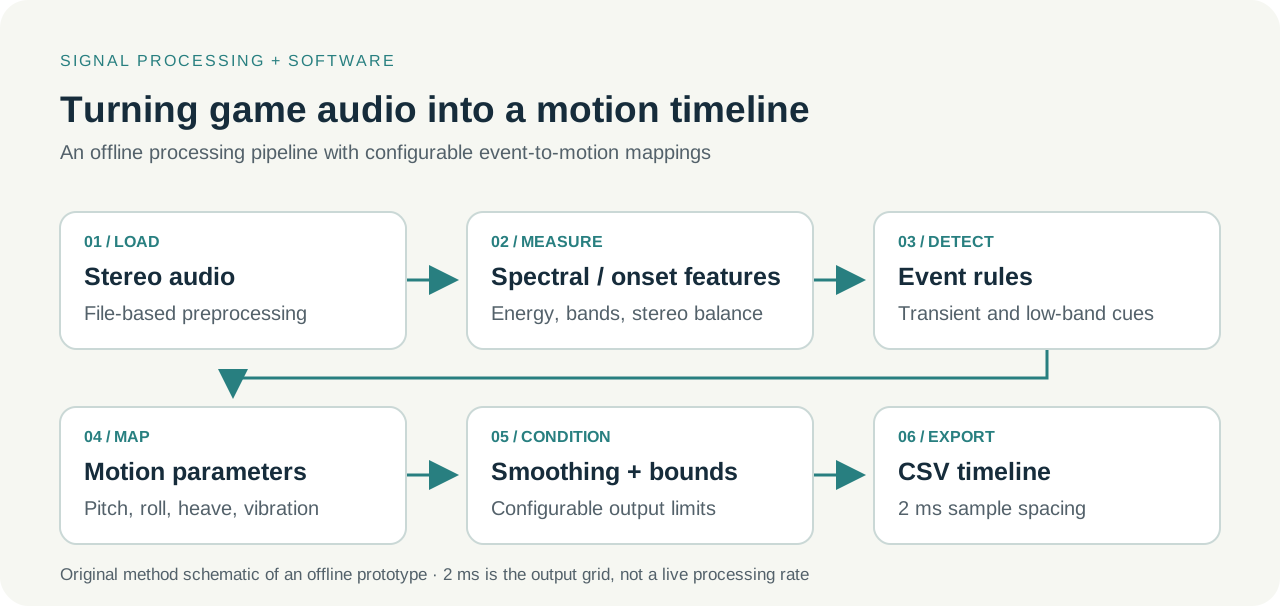
I built a modular, file-based workflow that extracts spectral and onset features, applies event rules and configurable motion mappings, then smooths and bounds the resulting signals before exporting a motion/vibration timeline.
Task & my role
Develop the offline processing modules, configuration presets and CSV-output workflow.
Method
Audio features and event rules → motion mapping → smoothing and configured bounds.
Output & evaluation
Python modules, presets and CSV timelines, with saved synthetic-example and output-schema checks.
Load stereo audio
Prepare a recording file for analysis.
Extract spectral and onset features
Measure energy, frequency-band cues and stereo balance.
Apply event rules
Identify transient and low-band cues for the configured mappings.
Map events to motion parameters
Generate pitch, roll, heave and vibration values using adjustable rules.
Condition the signals
Smooth the outputs and apply configured limits.
Export a CSV timeline
Write values on a 2 ms output grid for a subsequent integration step.
Original method explanation. The 2 ms spacing describes the output grid; it does not establish live processing at 500 Hz. Hardware integration and physical safety remain separate validation tasks. Open the larger workflow schematic (SVG): offline audio-to-haptics.
PythonlibrosaYAML configurationCSV tooling
05Audio DSPMATLAB / Simulink prototype
Classical denoising with an inspectable signal path
I developed a MATLAB/Simulink workflow to compare spectral subtraction and Wiener filtering through inspectable processing steps and before/after signal views.
Task & my role
Implement the classical filtering workflow and prepare signal comparisons for algorithm development.
Method & setup
Spectral subtraction and Wiener filtering. The saved Wiener demonstration uses a clean reference to initialise its noise estimate.
Output & evaluation
A MATLAB/Simulink model and saved signal outputs; no general intelligibility benchmark is established.
Applying the method to other recordings requires an appropriate noise estimate and a separate evaluation.
Feature preparation, offline evaluation and export workflows. The compact-classifier case shows the scope and the separate device-testing step; my published heart-sound classification studies show personally attributed model development.
I scope the analysis around the decision or workflow the recording needs to support.
Understand the recording and goal
Define the input format, acquisition conditions, required outputs and criteria for a useful result.
Build an inspectable baseline
Start with signal diagnostics and a reproducible workflow; add models where they help answer the question.
Deliver the workflow and its limits
Agree the plots, data format and assumptions to report. Check reproducibility and output schemas against the task, then document limitations and next tests.
Have a recording or a signal problem?
Start with the goal, input format and approximate duration or volume, acquisition conditions, required outputs and any target platform or deadline.
Please describe the task before sending any recordings; we can then agree the scope and how recordings will be shared and handled.